Read your Funnel Analytics
Who arrived, where from, how far they got and who converted. How to read the Analytics page, filter it and open one visitor's journey.
On this page
The short version
 The short version
- The Analytics page shows how many visitors arrived, how far down your funnel they got and how many converted, for the dates you pick.
- Filter it by where visitors came from, an initiative, the page they landed on, their country or how far they got.
- Open any visitor to see their whole journey. The same numbers become context for your next pitches and briefs.
Mole Marketer includes Funnel Analytics, so the marketing your team does has a measure after it as well as a reason before it. At Northfield Roasters the funnel is the path to a coffee subscription, and a few minutes on the Analytics page each Friday tells Priya which step loses people and which initiatives brought in the visitors who stayed.
Before you start
The page needs the tracking tag on your site and a funnel to count against. If you have not done those yet, install the tracking tag and record the path customers take on your site. Everyone who can open the property can read the page.
Read the readout
Choose Analytics in the sidebar. Under the title, "Visitors, steps and conversions to inform your marketing", three numbers sit above a bar for each step of your funnel.
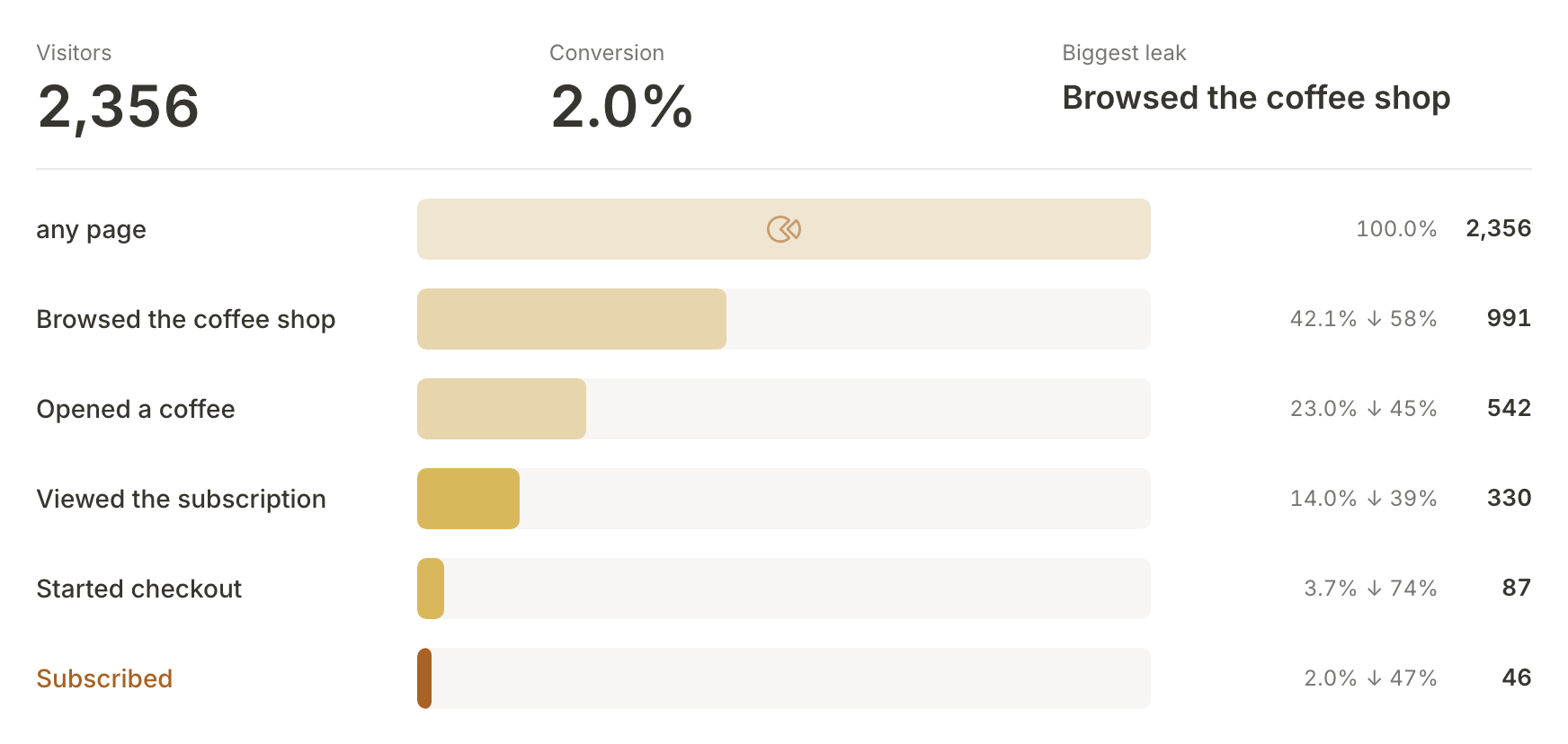
- Visitors is everyone who first arrived in the dates you picked.
- Conversion is the share of visitors who reached your first step and went on to reach your last one, here Subscribed.
- Biggest leak names the step that lost the most people from the step before it. For Northfield it is Browsed the coffee shop: most visitors read one page and never open the shop.
Each bar shows how many visitors reached that step, what share of the first step that is, and, beside the arrow, the share of the step before that was lost on the way. The last step is drawn in gold because reaching it is the conversion.
Pick the dates
The page opens on the last 7 days, today included, the same dates as Last 7 days. The date range in the top right of the grey card opens a list of ranges: Today, Yesterday, Last 7 days, Last 30 days, Week to date, Month to date and Custom, where you type a start and end date. The arrows either side step back or forward by the same number of days.
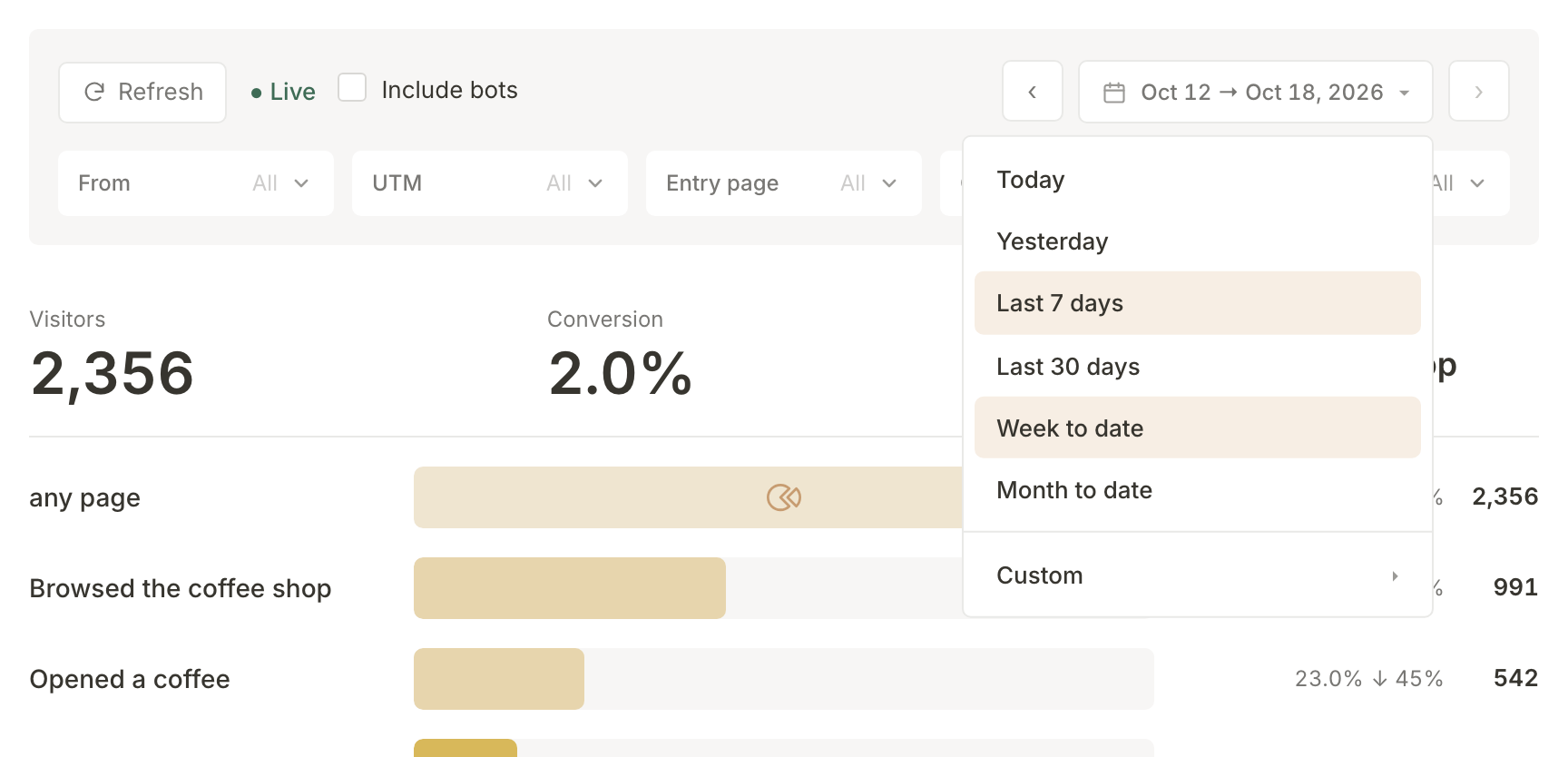
A visitor counts in the dates they first arrived. So the conversions for a week are the people who arrived that week and have subscribed since, even if they subscribed a few days later. Visits from bots are left out unless you tick Include bots. Refresh clears every filter and puts the dates back to the last 7 days.
Filter it
Under the dates is one row of filters:
- From keeps visitors who arrived from one website, such as google.co.uk or l.instagram.com.
- UTM keeps visitors who came in on one tagged link. A UTM tag is the bit added to the end of a link that says where it was shared. Your initiatives are listed first, each with its conversions and its visitors, so choosing one shows the traffic that initiative brought in. The raw tags are listed below them.
- Entry page keeps visitors who landed on one page first.
- Country keeps visitors from one country.
- Stage reached keeps visitors who got at least as far as the step you choose.
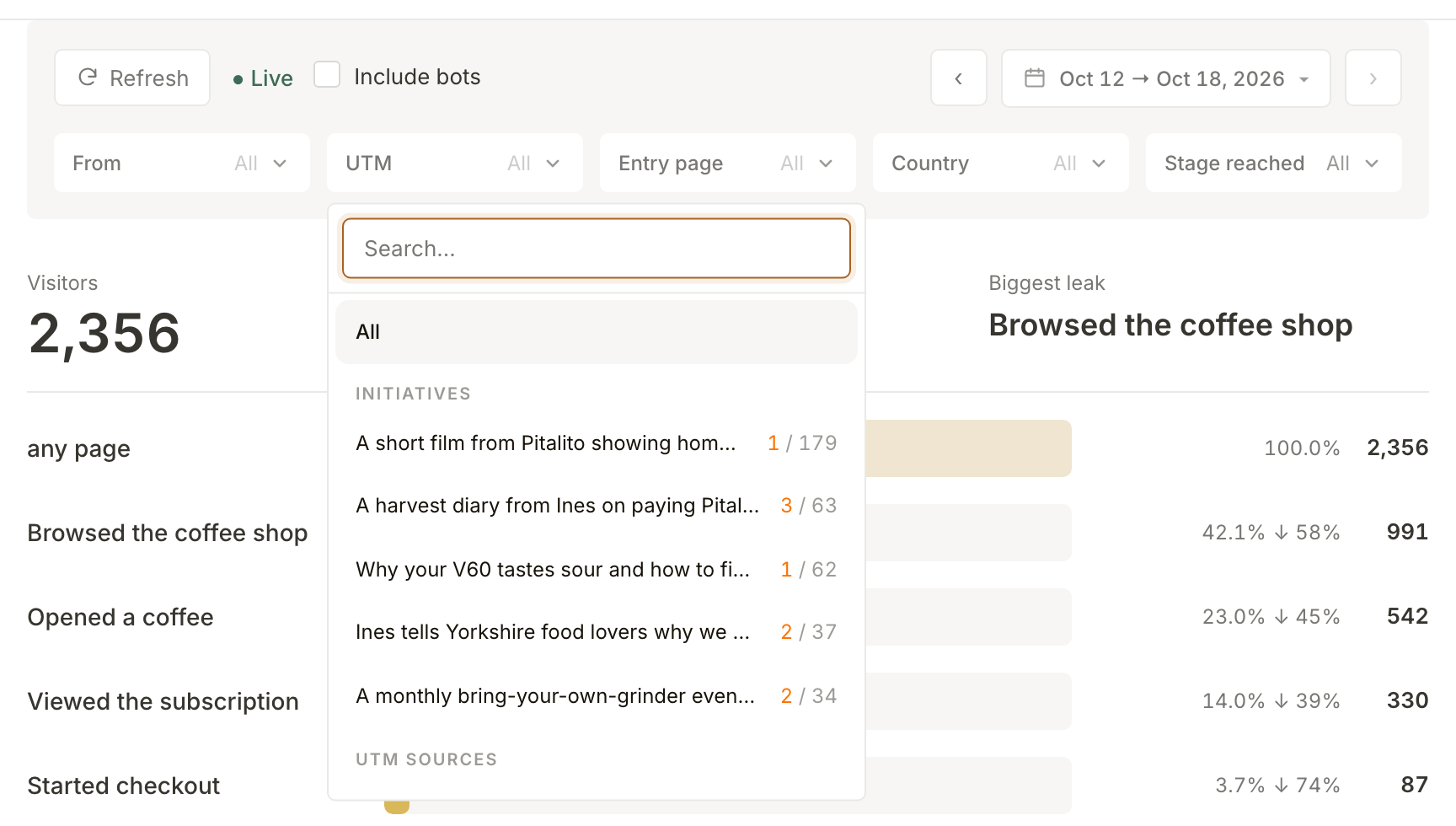
Each list shows its counts before you choose. Filters combine, every number on the page follows them, and the × beside a chosen value is Clear filter.
Split the first step by entry page
The first bar has a small glyph in the middle, Split the first stage by entry page. Press it and the bar splits into one part for each page visitors landed on, widest first, with the smallest folded into Other entry pages. Hover a part to see its visitors and its share of the step.
For Northfield the widest part is /brew/v60, the brewing guide the search initiative is built around. The split lasts until you change a filter or the dates.
Watch visitors over time
Visitors over time has a column for each day, or for a few days at a time over a long range. Each column is stacked by the step its visitors stopped at, with the deepest at the bottom and gold for the ones who converted. Your chosen dates are the highlighted window, with the same number of days either side of it for comparison, up to today. Drag the window's edges, or the window itself, to change the dates for the whole page.
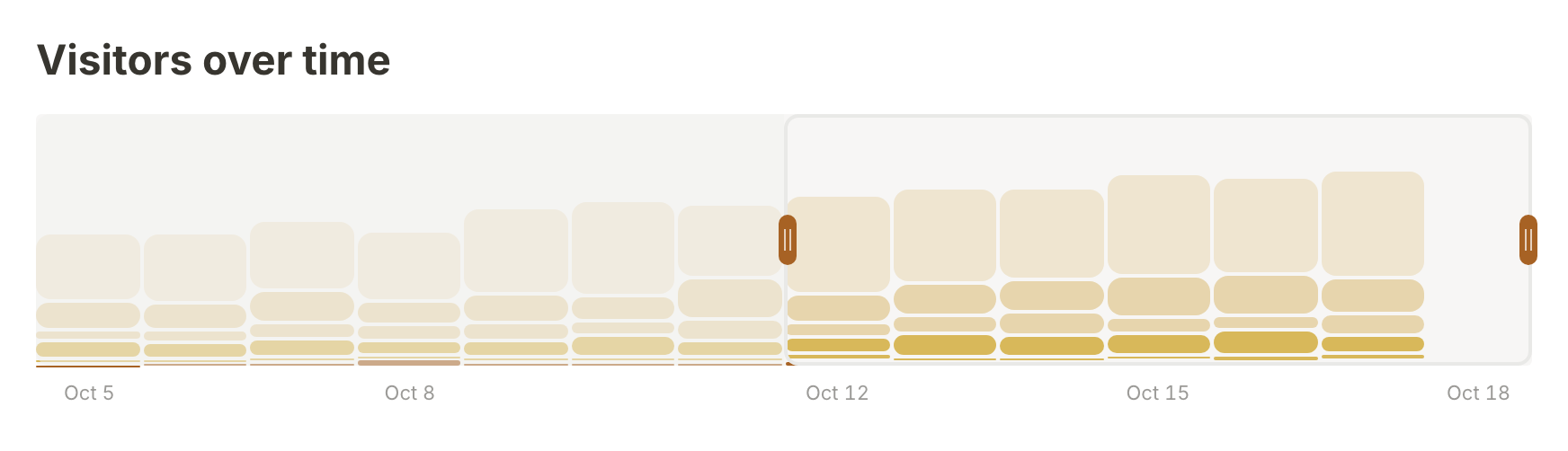
A dotted line on a day marks an edit Funnel Analytics noticed on one of your most visited pages, so you can line a change in the numbers up with a change on your site.
Open a visitor's journey
Visitor journeys lists the visitors behind the numbers, with where they came from, the page they landed on, how far they got and whether they are Converted, Browsing or Bounced. Search covers the visitor's number, entry page, referrer, country and UTM tags, and Columns and sorting, beside it, chooses the columns and the order.
Click a row and the Visitor journey opens beside the page: where they came in, the site that sent them, their source and campaign, how many pages they viewed, and an Event trail of every page view, click and step in order, with the gaps where they went away and came back.
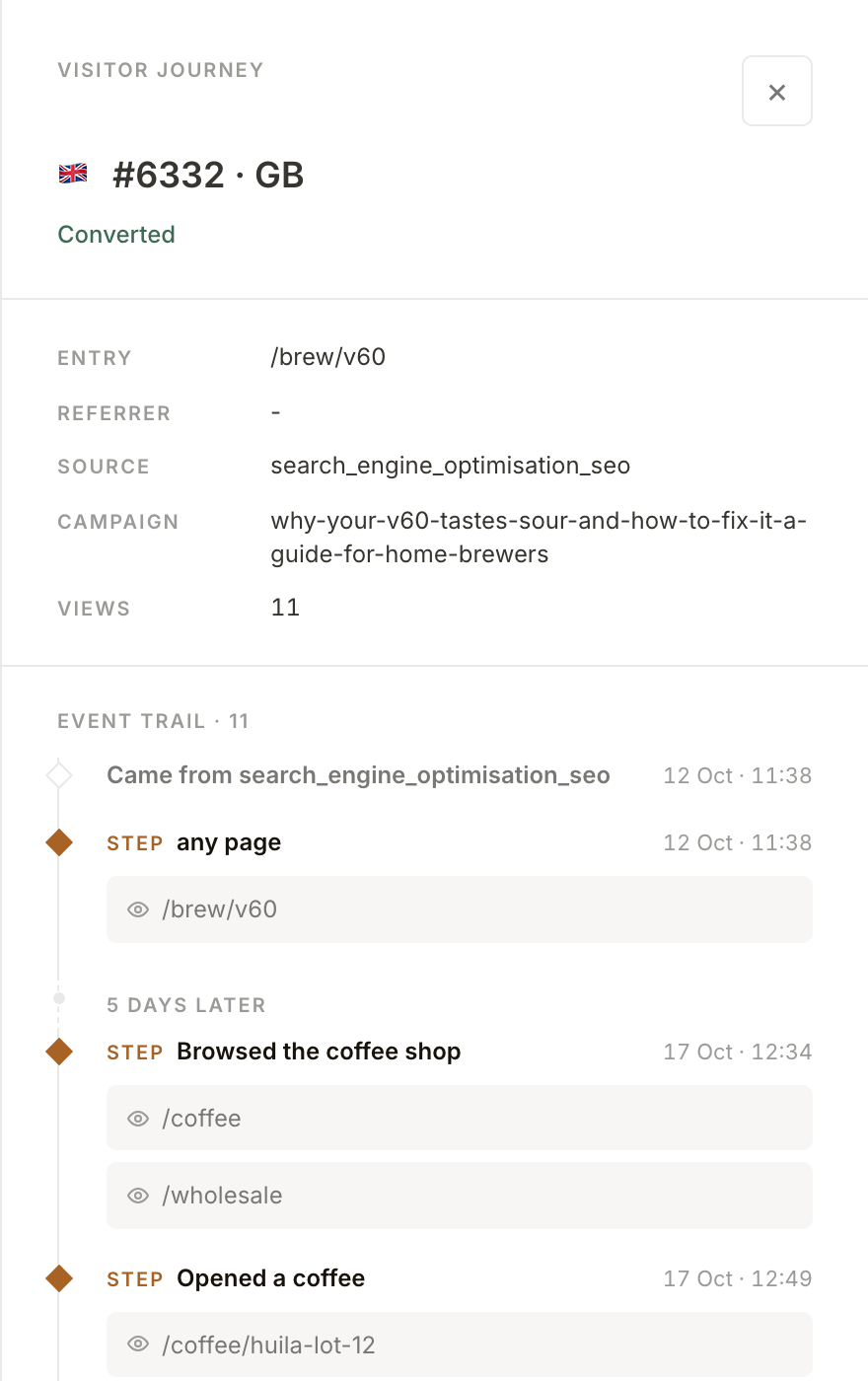
This subscriber arrived on the V60 guide from a link tagged by Northfield's search initiative, came back five days later, opened a Huila lot and subscribed.
See how it feeds the next pitch
Every night, Mole Marketer reads the last 90 days of your Analytics by entry page: how many visitors each page brought in, how many converted and where they came from. The busiest twenty pages go into the business context every initiative pitch and brief is built from, so a page that brings in subscribers is something the next pitch can build on.
What happens next
Each live initiative carries its own tags, so its traffic can be told apart from everything else. See see what traffic an initiative brings.
Frequently asked questions
Why do a week's conversions include people who subscribed later?
Every number on the page counts visitors by the day they first arrived. A conversion in a week is someone who arrived that week and has reached your last step since, whenever that was.
Is there a weekly summary by email?
Yes. Every Friday, everyone who can read an active property's Analytics gets a report covering the seven days up to the day before. See choose which emails you get.
Does it use cookies?
No. Funnel Analytics remembers a visitor with an id kept in their browser's own storage, not a cookie. That describes how it works, not a promise about the rules your own site follows, so check those with whoever advises you.