Use Mole Marketer from ChatGPT or Claude
Connect Mole Marketer to ChatGPT, Claude or another MCP client, then ask about your Analytics, initiatives, pitches and ready briefs in plain English, and record your decisions on pitches.
On this page
The short version
 The short version
- Add Mole Marketer to ChatGPT or Claude as a connector, with one address, and sign in once.
- Ask about your Analytics in plain English, or ask for your initiatives, pitches and ready briefs.
- It reads what your account can read. It can make the changes your buttons make, such as editing a brief, accepting a pitch or starting pitching, and only when you tell it to.
What works from chat today
Mole Marketer's MCP server reads your Funnel Analytics, initiatives, pitches and briefs, your Context and the help docs. It can draft and edit initiatives and briefs, accept or decline a pitch once you have decided, and start pitching or a brief draft. Answering a brief's questions from chat is still to come.
MCP is how ChatGPT, Claude and other AI assistants connect to the tools you use. Connect Mole Marketer once and the chat can read your account for you. At Northfield Roasters, Priya asks Claude which pages brought in subscribers this month before she reviews the week's pitches, and Tom pulls the ready podcast brief into a chat to draft the email to a show's host.
The address to connect is:
https://molemarketer.com/mcp
The server is called Mole Marketer MCP Server, which is the name some apps show. If you connected earlier at https://tiny-funnel.com/mcp, that connector keeps working and you do not need to add it again.
Add it to ChatGPT
Do this in a browser, at chatgpt.com/plugins. Press + to open New Plugin and fill it in:
- Name: Mole Marketer. The description is optional.
- Connection: leave it on Server URL and paste
https://molemarketer.com/mcp. - Authentication: OAuth. Nothing under "Advanced OAuth settings" needs changing: ChatGPT reads it all from the server and registers itself. There is no client id, secret or API key.
- Tick I understand and want to continue, which ChatGPT asks of every custom MCP server, then press Create.
ChatGPT then offers to sign you in. Press its sign-in button and approve the connection on Mole Marketer's own screen (see below). After that, ask for it by name in a chat ("check Mole Marketer for...").
Add it to Claude
In Claude, open Settings, then Connectors, then Add and Add custom connector. Give it a name, such as Mole Marketer, which is what your connectors list shows. Paste https://molemarketer.com/mcp as the address and press Continue.
On the next screen:
- Authentication: choose Required when the server asks, or Always required if you would rather sign in straight away. Do not choose None: every tool that reads your data needs your account behind it.
- OAuth client: change it to No client ID, register one automatically. Mole Marketer does not read the client details Anthropic hosts, so the recommended option cannot work; instead Mole Marketer registers Claude itself as you connect.
Leave the other settings as they are, press Add, then Connect on the connector's row.
Approve the connection
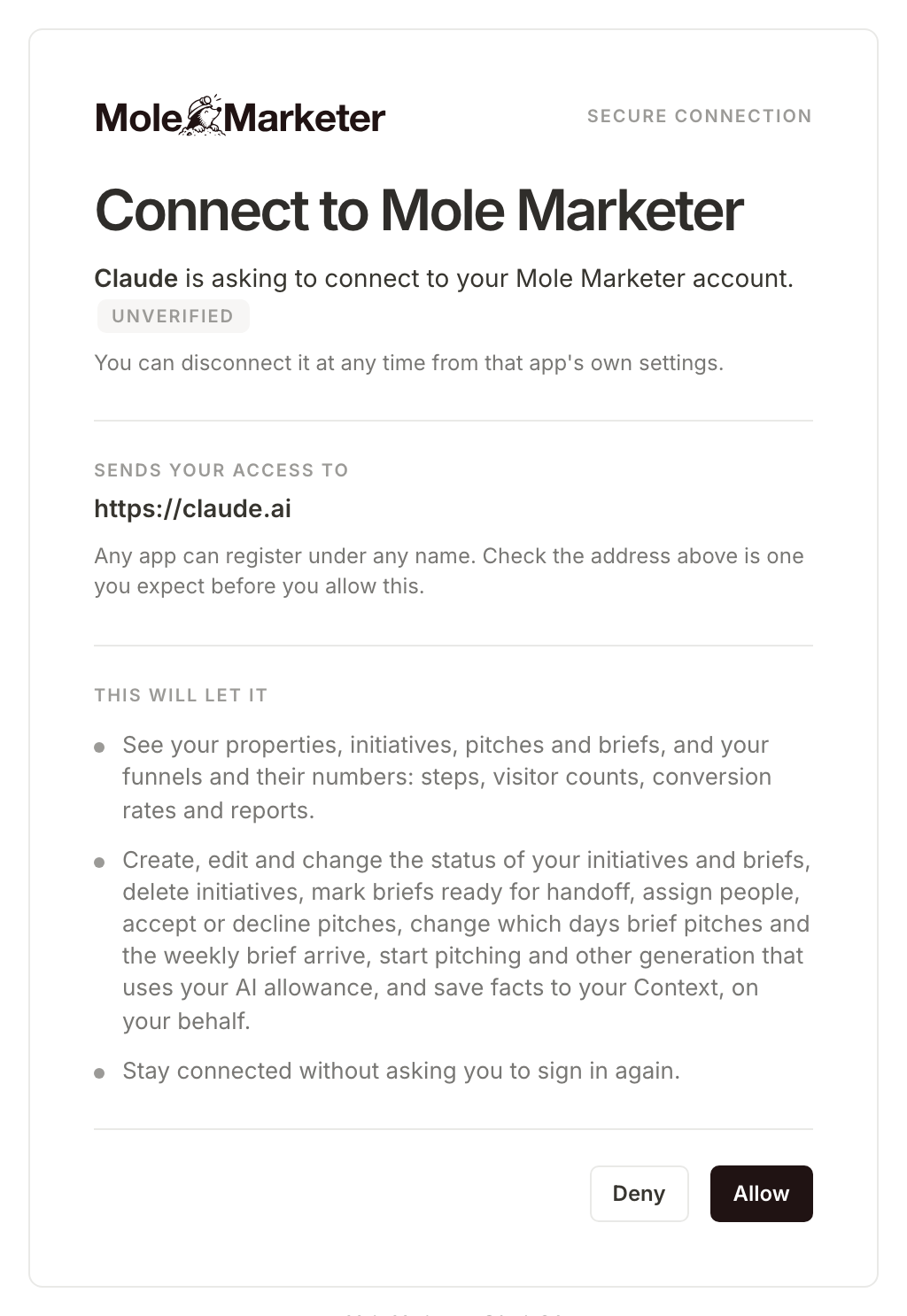
Connecting is signing in to Mole Marketer. The screen names the app asking and the address your access is sent to. Any app can call itself anything when it registers, so check the address is one you expect, such as https://claude.ai or https://chatgpt.com, before you press Allow. If it is not, press Deny.
Under This will let it, the screen lists what you are allowing: seeing your properties, initiatives, pitches and briefs, and your funnels and their numbers; Create, edit and change the status of your initiatives and briefs, delete initiatives, mark briefs ready for handoff, assign people, accept or decline pitches, change which days brief pitches and the weekly brief arrive, start pitching and other generation that uses your AI allowance, and change your business context or save facts to it, on your behalf; and staying connected without asking you to sign in again.
Add it to anything else
The server speaks Streamable HTTP with OAuth 2.1 and registers clients itself, so any current MCP client can connect with the address alone.
In Claude Code:
claude mcp add --transport http mole-marketer https://molemarketer.com/mcp
In an editor or client that takes a config file:
{
  "mcpServers": {
    "mole-marketer": {
      "type": "http",
      "url": "https://molemarketer.com/mcp"
    }
  }
}
A client that only connects to local programs can reach it through a bridge such as mcp-remote.
Ask about your Analytics
Plain questions work. The assistant picks the tools, reads as much as it needs and does the judging.
- "Which entry pages brought in the most subscribers this month?"
- "How many visitors did the podcast guesting initiative bring, and how far did they get?"
- "Why did conversions drop last week?"
- "Somebody subscribed from Germany yesterday. What did they look at first?"
- "My numbers look wrong. Is the funnel still recording?"
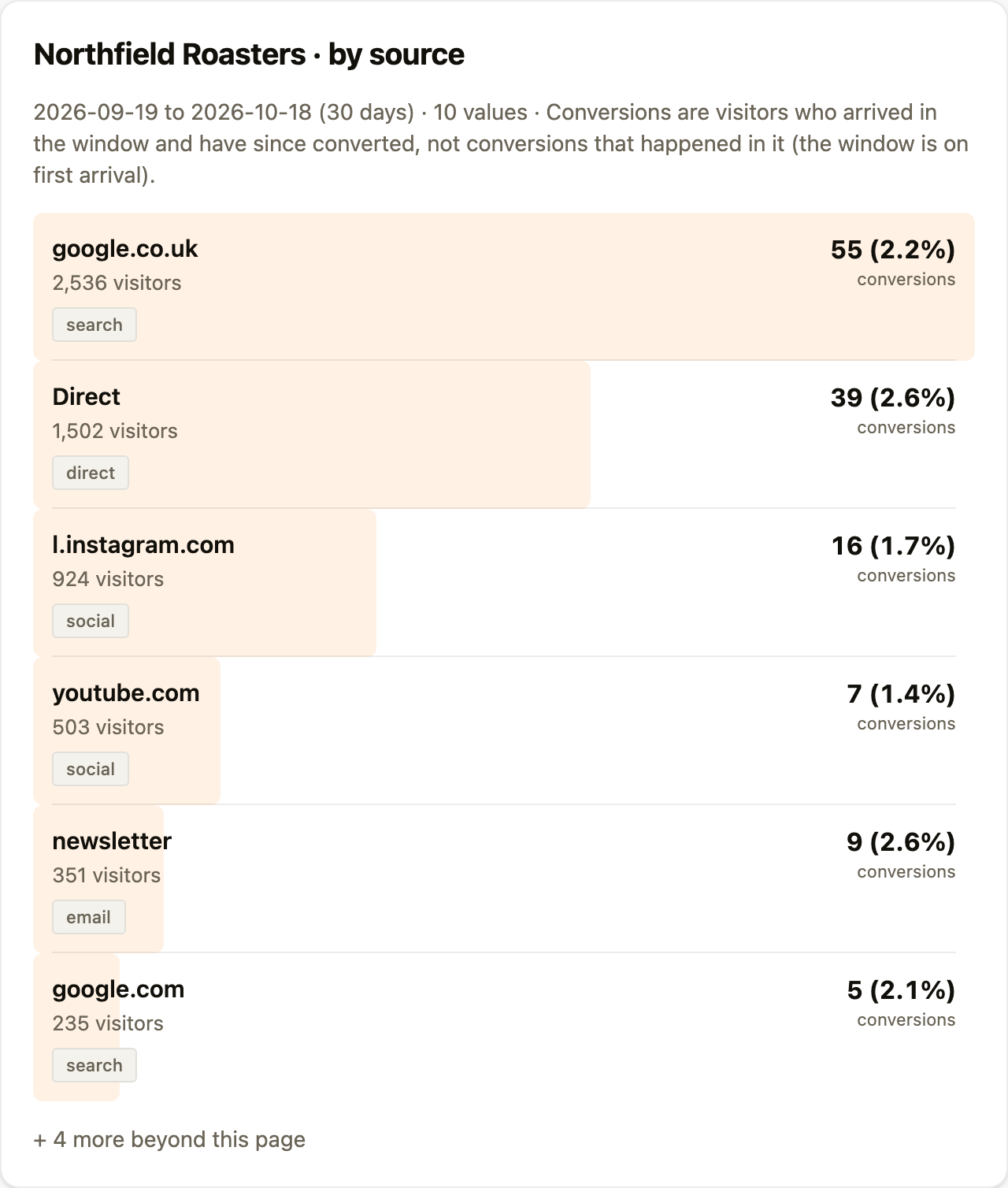
Where the app supports it, an answer arrives with a panel beside it, drawn from the same numbers the assistant is reading.
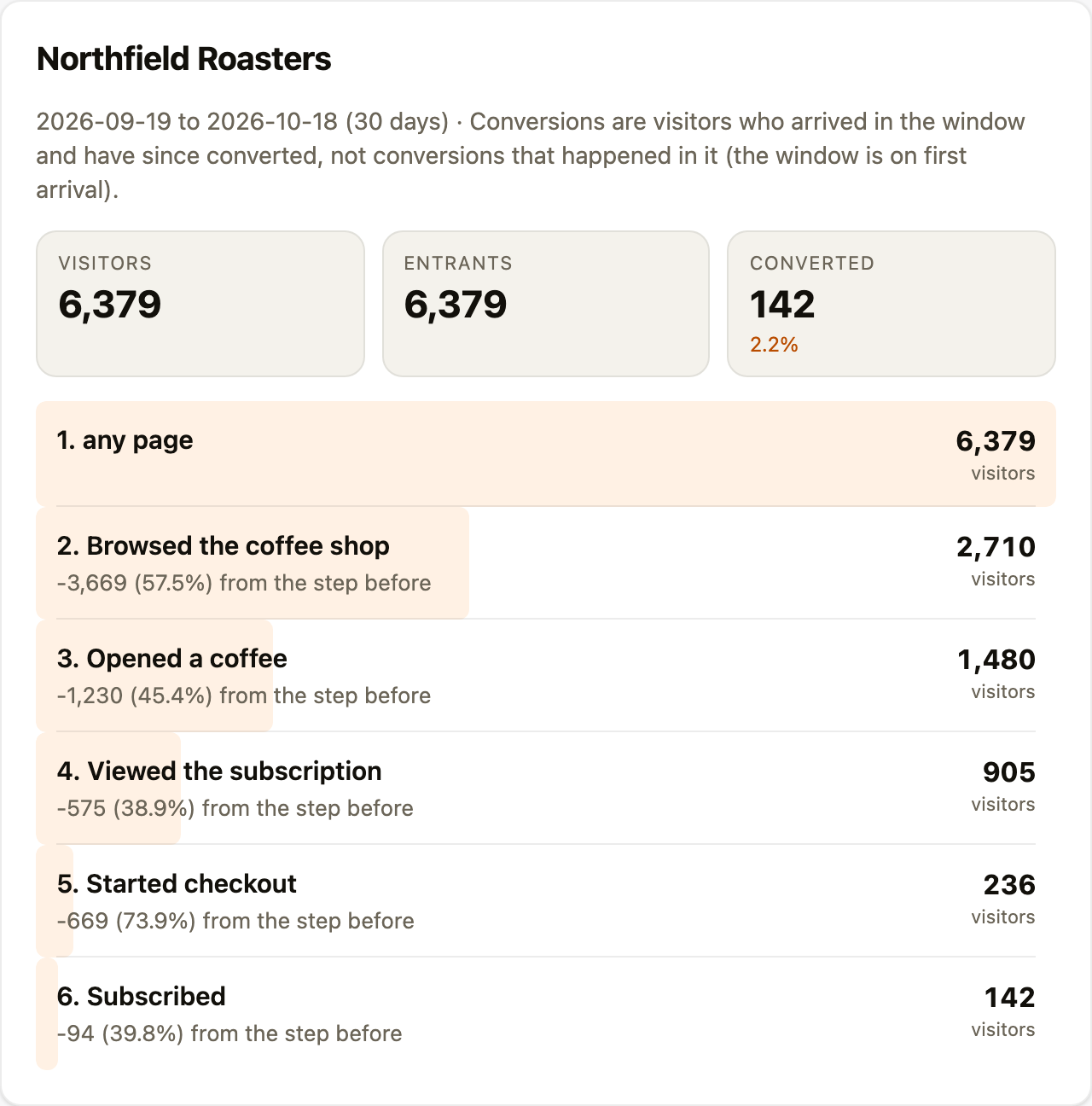
Two things to know before you read an answer. The tools look at the last 30 days unless you ask for other dates, where the Analytics page opens on the last 7 days. And, as on the page, visitors count in the dates they first arrived, so a month's conversions are people who arrived that month and have converted since.
Ask about your initiatives, pitches and briefs
- "List the ready briefs for Northfield Roasters."
- "What initiative pitches are waiting, and how did each score?"
- "Get the Taste the origin brief and draft the email to the podcast host."
The assistant can list your properties, each property's initiatives with their marketing channel, the pitches waiting for a decision with their five scores, and an initiative's briefs. Briefs that are ready or handed off are listed unless you ask for drafts or finished ones too. It can read a ready, handed-off or finished brief in full: the outline, the first draft if there is one, your team's answers, the reasons it is worth doing and its citations. Each read is recorded as Read over MCP in the brief's hand-off log. To hand a brief over in other ways, see hand a brief to whoever does the work.
Each brief also has an address of its own, shown under Consume with MCP on the brief's page: molemarketer://briefs/ followed by the brief's name. An app that reads MCP resources can open the brief by that address, and that read is recorded in the hand-off log too. Addresses copied before the rename, starting mecha://briefs/, still work.
Accept or decline a pitch from chat
Once you have read a pitch and made up your mind, you can tell the assistant and it records your decision, the same as pressing Accept or Decline on the pitch.
- "Accept the bakery evening pitch."
- "Decline the brew videos pitch. We have done it already."
Accepting an initiative pitch makes the initiative live and asks for its first brief pitches, as it does in the app. Accepting a brief pitch makes it a draft brief. Either way the assistant gives you the link to open it. When you decline an initiative pitch you can give one of the same four reasons the app offers: wrong channel, done already, off brand or not now. Brief pitches take no reason.
The decision is yours. The assistant can help you weigh a pitch, but it should only record a decision you have given it. It cannot decide a pitch that has expired or that someone has already decided.
What it can see and do
- It sees what your account can see. The properties, funnels, initiatives and briefs you can open in Mole Marketer, and nothing else.
- It can make the changes your buttons make, and only if you allowed it to make changes when you connected. It can create and edit initiatives and briefs, change their status, delete initiatives, assign people, accept or decline pending pitches, start pitching and other generation, change which days brief pitches and the weekly brief arrive, and change your business context or save a fact to it. Each goes through the same checks as the button it stands for: a brief needs an outline before it is ready, text someone edited by hand is never overwritten, generation uses your AI allowance, and only owners and admins can change the schedule or your Context. It cannot change billing, members, connections or any other setting.
- It is rate limited to 60 tool calls a minute per connection, far past what a conversation needs.
- Disconnect from the app's own settings. Removing the connector in ChatGPT or Claude ends the access.
Frequently asked questions
What does the permission to make changes cover?
What the connection screen lists: Create, edit and change the status of your initiatives and briefs, delete initiatives, mark briefs ready for handoff, assign people, accept or decline pitches, change which days brief pitches and the weekly brief arrive, start pitching and other generation that uses your AI allowance, and change your business context or save facts to it, on your behalf. Assistants are told to change things only once you have asked them to, and most ask you before they do.
What tools does it have?
Ten for Analytics: list_funnels, get_funnel, funnel_report, funnel_breakdown, funnel_trend, funnel_insights, list_visitors, get_visitor, list_page_changes and funnel_health. Five read your work: list_properties, list_initiatives, list_pitches, list_briefs and get_brief. Others read more of it (get_initiative, get_pitch, get_property_context, list_channels, get_allowance, get_run, get_schedule) and answer questions from the help docs and your Context (search_docs, read_doc, search_context, ask_context). The rest change it: create_initiative, update_initiative, create_brief, update_brief, set_initiative_status, set_brief_status, mark_brief_ready, delete_initiative, assign_people, unassign_people, set_brief_pitch_days, set_weekly_brief_day, decide_pitch, save_to_context, update_property_context, and the generation tools pitch_initiatives, pitch_briefs, generate_brief, update_brief_draft, generate_deliverable and generate_image.
Can it see another business's data?
No. Every tool works through your own sign-in, so it only reaches the properties your account can open.