Ask for new initiative pitches now
Do not want to wait for the weekly run? Start one yourself from the initiative pitching board, and see what each stage is doing.
On this page
The short version
 The short version
- Open Manage Initiative Pitching and press Run now.
- Each run draws two marketing channels, reads your business context and pitches the best three ideas for them.
- New pitches wait for you on the Marketing page. Each run uses some of the property's monthly AI allowance.
Mole Marketer pitches new initiatives once a week while your property is active. Sometimes a week is too long to wait. At Northfield Roasters, Priya has said no to most of this week's pitches and has a free Friday afternoon, so she asks for a fresh round now rather than on Monday. It takes one button and a few minutes, and the pitches it makes are the same kind you review every week.
Before you start
A run needs your business summary, your ideal customer and at least two scored marketing channels, which Mole Marketer drafts from your connected sources. If they are not ready yet, see Give Mole Marketer your business context.
Open the initiative pitching board
In the sidebar, under Marketing, choose Manage Initiative Pitching. The page is called Pitching new initiatives. Its top line shows the last run: whether it is complete, when it started, how long it took and the weekly schedule, in your property's timezone (for Northfield in October, Weekly · Mon 05:00 BST). Run history lists earlier runs, so you can look back at any of them.
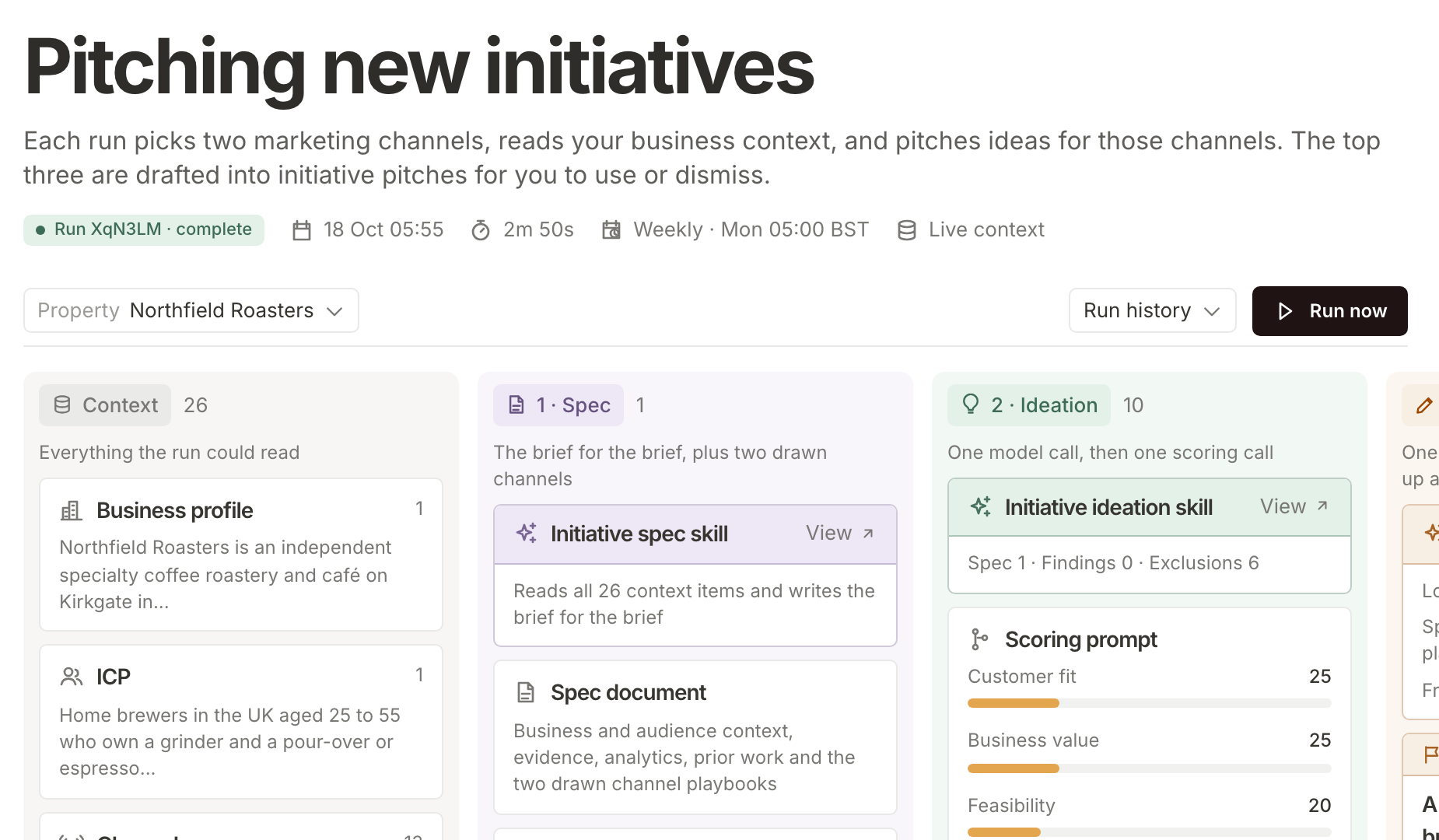
Press Run now
Press Run now. A run uses some of the property's monthly AI allowance. The button greys out and the board says Workflow running: "This workflow is running. Stage results update here as they finish." You can leave the page and come back.
You can also start a run from the Marketing page: Generate beside Initiatives and Generate more under Initiative pitches do the same thing.
Follow the stages
The board reads left to right, one column per stage. Here is what each one does, in plain words.
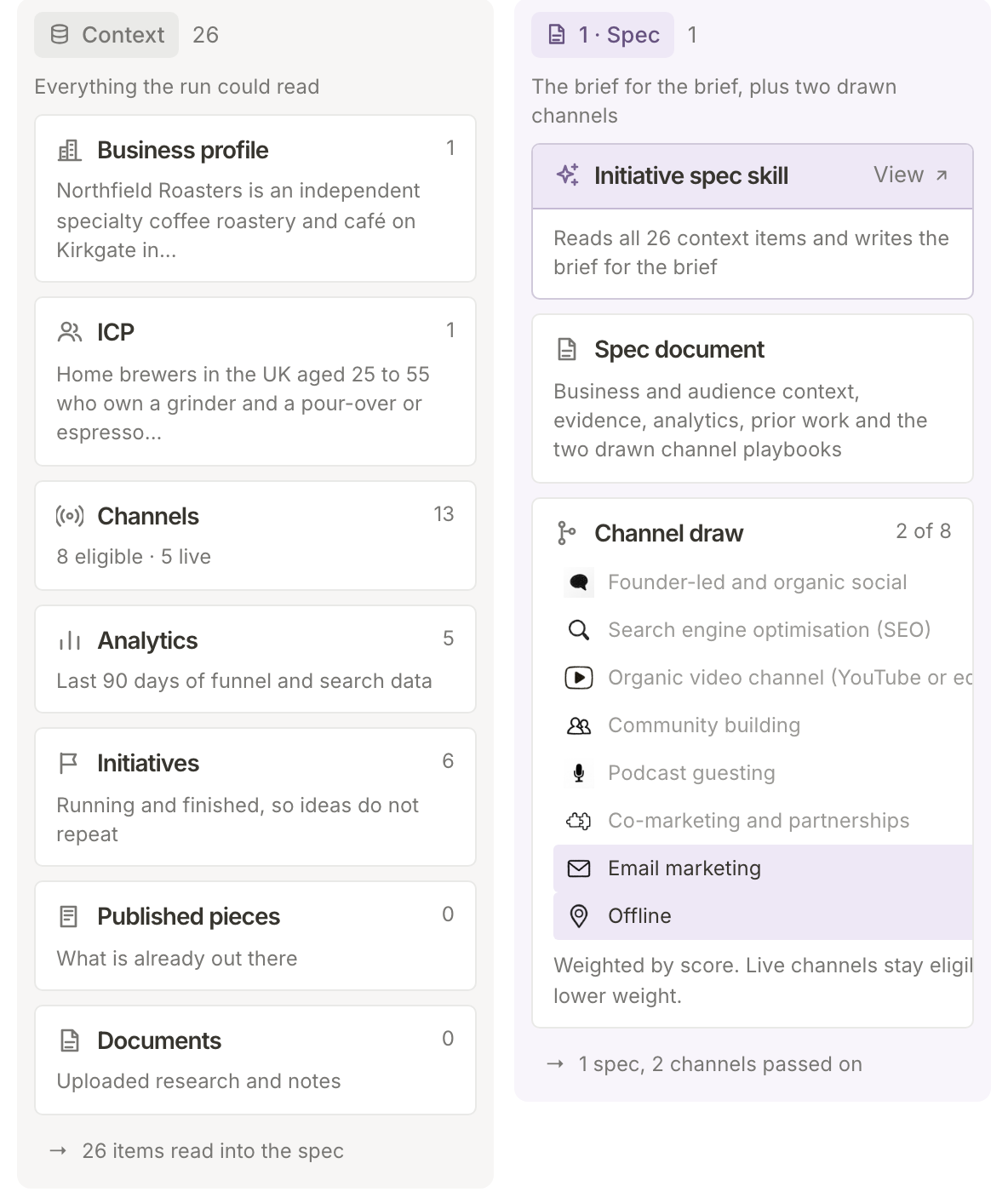
Context is everything the run could read: your business profile, your ideal customer, your scored marketing channels, a summary of the last 90 days of your Funnel Analytics, and the initiatives you already have, so ideas do not repeat. 1 · Spec writes the brief for the brief: one document that sets out the business, the audience, the evidence and two marketing channels drawn for this run. The Channel draw shows which two were picked. Higher-scoring channels are more likely to be drawn, and channels you already run stay in the draw at a lower weight. In Priya's last run it drew Email marketing and Offline.
2 · Ideation comes up with ideas for those two channels, then scores each one on customer fit, business value, feasibility, channel fit and novelty, using the weights shown on the Scoring prompt card. The top three across both channels are marked Winner. Each channel keeps at least one place, and cut concepts lists the ideas that did not make it, with their scores.
3 · Pitches writes each winning idea up as a full initiative pitch, with a fresh search of your context on its topic. Each card shows its marketing channel, its score and how many citations it carries, and starts as Needs review. A pitch that fails the evidence checks is not published, so a run can end with fewer than three.
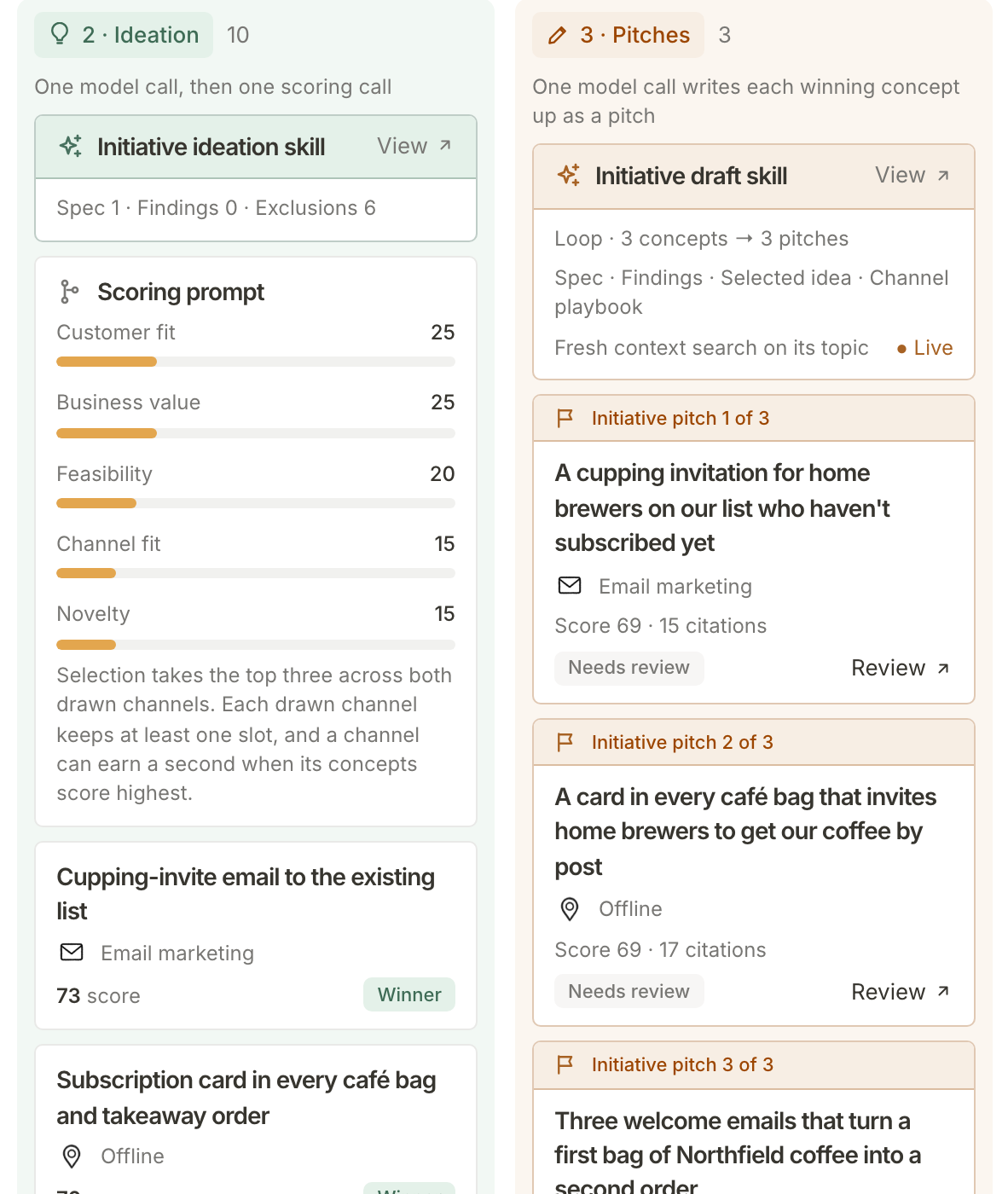
Each stage card has a View link to the skill it follows, if you want to read exactly what it was asked to do.
Review what it pitched
When the run is complete, press Review on any pitch card to open it, or Review all at the foot of the Pitches column to go to the Marketing page's Initiative pitches. From there it is the same as reviewing a weekly pitch: read why it fits, check its evidence, then accept or decline.
What happens next
The new pitches wait on the Marketing page alongside any others, and everyone who can open the property gets a notice about each one. Review this week's initiative pitches covers how to judge them. For more on how a pitch is researched and scored, see See how a pitch is researched and scored.
Frequently asked questions
Why can I not start a run?
If Run now is greyed out, a run is already going for this property and the board is showing it. It comes back once that run finishes. If the board says Allowance used, this month's AI allowance is spent, and the banner says the date Run now becomes available again.
Why does it ask me to finish the business profile?
A run needs a business summary, an ideal customer and at least two scored marketing channels. Until then it says "Finish the business profile, ideal customer and channel scores before generating an initiative." Your Context page is where those are drafted and edited.
Can team members run it?
Yes. Anyone the property is shared with can press Run now, and the run uses the property's allowance whoever starts it.
Does running now change the weekly run?
No. The weekly run still happens on Monday as usual. Running now simply gives you an extra round of pitches.