Send server-side events from your backend
Send named conversion events from your own backend, and Funnel Analytics attaches them to the visitor who triggered them.
On this page
The short version
 The short version
- Post a named event with your funnel's API key, from the Server side (optional) tab of the Install section.
- Send
external_id,visitor_tokenoripso it can find the visitor who caused it. - Add a Server event step with the same name to count it in the funnel.
This is a developer reference for whoever looks after your site's backend. Some conversions never happen in a browser: a subscription renews in a billing system, a wholesale order is keyed in by the café team, an invoice is paid on a schedule. The server-events API lets your backend send those moments to Mole Marketer's Funnel Analytics as named events, and each one is attached to the visitor who caused it.
A server event can never be a funnel's first sight of someone. It attaches to a visitor the funnel has already seen through the tracking tag, or it is dropped. That is deliberate: an event with no browsing behind it has no entry page, no referrer and no journey, and would only muddy the numbers.
The endpoint
POST https://molemarketer.com/api/v1/events
Authorization: Bearer YOUR_API_KEY
Content-Type: application/json
A backend already posting to https://tiny-funnel.com/api/v1/events keeps working with the same key; there is nothing to change.
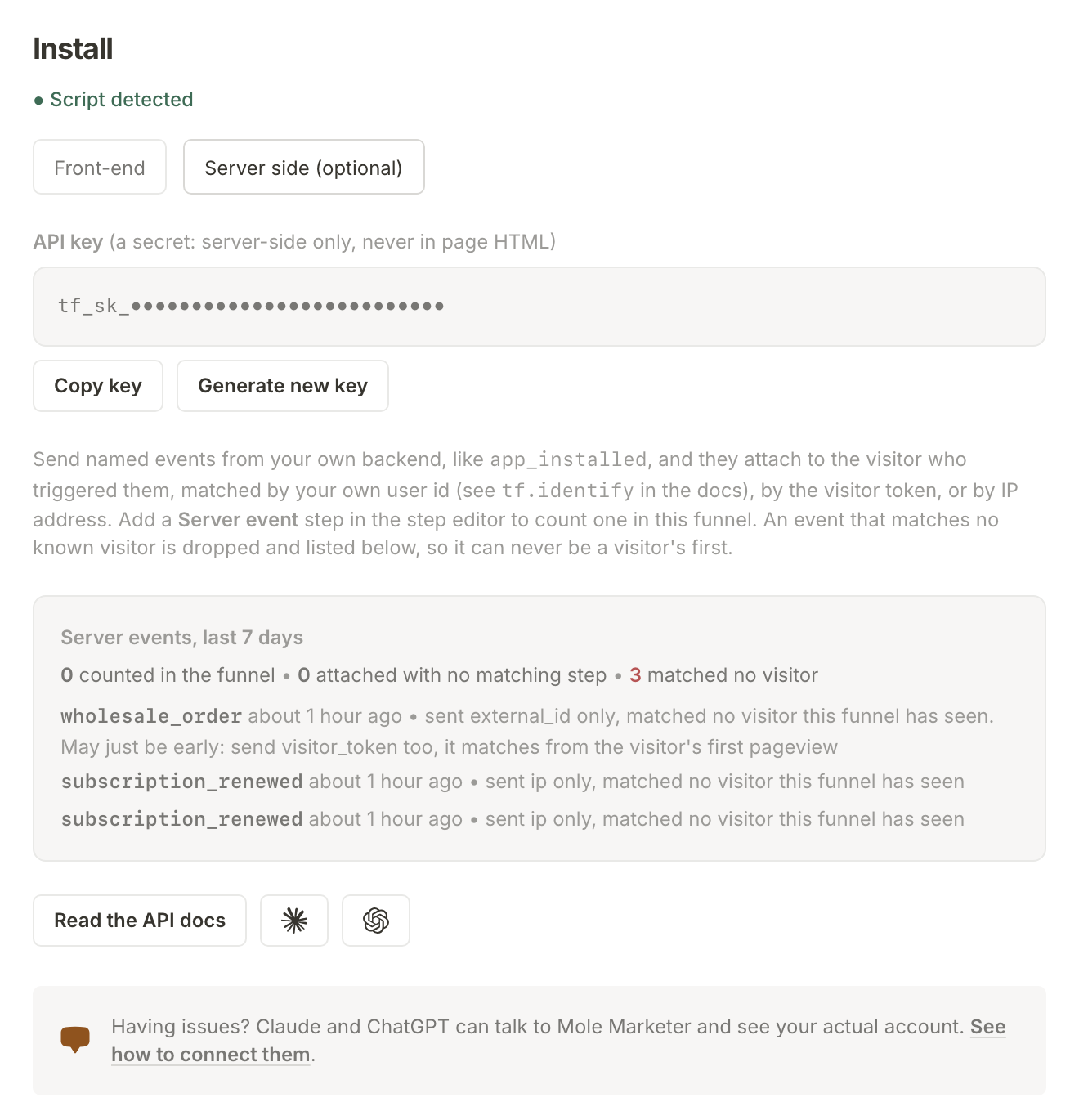
The API key is on the Analytics page, in the Install section under Details, on the Server side (optional) tab. It is a secret: keep it in your backend's environment, never in page HTML or client-side code. Generate new key replaces it, and the old key stops working at once.
curl -X POST https://molemarketer.com/api/v1/events \
  -H "Authorization: Bearer YOUR_API_KEY" \
  -H "Content-Type: application/json" \
  -d '{
    "name": "subscription_renewed",
    "external_id": "customer-8271",
    "uid": "renewal-8271-2026-10"
  }'
The Claude and ChatGPT buttons beside Read the API docs open a new chat with this reference already described, minus your key, and ask what your backend is built with.
Fields
| Field | Required | What it is |
|---|---|---|
name |
yes | The event name, 1 to 64 characters of letters, numbers, _, - and .. Case-sensitive, and it must match a Server event step's name exactly to count in the funnel. |
external_id |
one of these | Your own user id for the visitor, the same value your pages pass to tf.identify() or a tf-user meta tag. A stable database id, never an email address. The strongest match: it follows the person, whichever browser or device they are in now. |
visitor_token |
one of these | The visitor's Funnel Analytics id, read client-side from window.tf.visitor() and passed through your own stack. Exact, but tied to one browser. |
ip |
one of these | The original visitor's IP address, taken from the request your backend handled. Never your own server's address. |
user_agent |
no | The original visitor's browser user agent, from the same request you took the ip from. Used only to keep an IP match off the wrong device: a Windows conversion will never attach to an iPhone visitor. Send it whenever you send ip. |
uid |
recommended | Your own idempotency key for this event, up to 64 characters. Send the same uid on a retry and the event is only counted once. |
occurred_at |
no | ISO 8601 timestamp of when the event happened. Defaults to when it arrives. |
metadata |
no | A small JSON object of your own, stored with the event. |
Send at least one of external_id, visitor_token and ip, and send every one you have. They are tried strongest first: external_id, then visitor_token, then ip.
How matching works
- By external_id: the event lands on the visitor your site identified with that id, whichever browser or device they are using now. Your pages must identify signed-in visitors. It works both ways: an event that matches by token or IP but carries an
external_idwrites that id onto the visitor, so your server events double as the most trustworthy identify there is. Watch for the timing race on a fresh sign-up: if the server event fires in the same moment your page first identifies the browser, it can reach Funnel Analytics a beat before that identify has writtenexternal_idonto the visitor, and the event finds nobody to match. Carryingvisitor_tokenalongsideexternal_idcloses that window, since the token has existed since the visitor's first page view. - By token: exact. The event lands on that visitor, in the one browser that minted the token.
- By IP: the event lands on the funnel's most recently seen visitor from that address within the last 30 days, ignoring bots. IPv6 addresses match on their /64 prefix, since devices rotate the low half daily. An address names a network, not a person (a household or office can share one), so if you also send
user_agent, candidates from a conflicting device family are skipped and a wrong-device match is refused outright: a missed match beats a wrong one. One warning from experience: if your site and your backend's traffic resolve differently (one has IPv6 and the other does not), the same person can present a v6 address to one and a v4 address to the other, and those can never match. The Install section says so when it sees it. Give both the same connectivity, or carry a stronger matcher. - No match: the event is dropped, and recorded. It is not retried automatically, so recovering it is on you: your own idempotent retry (send the same
uidagain) or, better, carrying a stronger matcher the first time.
The Server side (optional) tab counts the last 7 days of server events (counted in the funnel, attached with no matching step, matched no visitor) and lists up to three recent drops, with which matchers each one carried, so a misfiring integration is visible instead of silent. To dig into why, connect Claude or ChatGPT to Mole Marketer and ask for the funnel's health: it reads the same counts and recent drops, alongside whether the funnel is recording at all and when a visit last arrived.
Your visitor's raw IP is used once, in memory, to compute the same salted hash the tracking tag's hits are stored under. It is not written to the database or put on the queue.
IP matching is honest but not perfect. Shared office networks and mobile carriers can put many people behind one address, which is why the event attaches to the most recent visitor and why a stale address matches nothing. Where your stack can carry visitor_token or external_id end to end, prefer them.
Counting it in your funnel
Add a step of type Server event under Add a step in Funnel steps, and give it the event name, like subscription_renewed. The step counts a visitor the moment an event with that exact name attaches to them. Per-step + when conditions work like any other step's. A funnel's first step cannot be a server event. Events whose name matches no step still show up in the visitor's journey, which is a handy way to check an integration before adding the step.
Responses
| Status | Meaning |
|---|---|
202 |
Accepted and queued. The body carries the uid used, yours or a generated one. Matching happens asynchronously, so acceptance does not mean a visitor matched. |
401 |
Missing or invalid API key. |
403 |
The funnel is not recording: the property is paused, billing has lapsed, or a property that finished setup without being activated is past its 30-minute test window. |
422 |
The name is missing or malformed, or none of external_id, visitor_token and ip was sent. |
429 |
More than 600 events a minute for this API key. Retry after a minute. |
Do it asynchronously
Send events from a background job or queue, never inline in a request a customer is waiting on. Your checkout should not wait on this API, and a network blip should not lose the event. The pattern that works:
- In the request handler, capture the visitor's IP and user agent (and
visitor_tokenor your user id if you have them) and enqueue a job with a stableuid. - The job posts the event and treats any non-2xx as a logged failure, retried by your queue's own retry policy.
- Because the
uidrides along, a retried delivery is never double-counted.
Getting the visitor token
On any page running the tracking tag, window.tf.visitor() returns the visitor's id once tracking has started. Put it in a hidden form field, a checkout attribute or a header to your own backend, store it against the user or order, and send it with the server event later. It outlives the session, so an event days after the visit still matches exactly.
Better still, if your visitors sign in: identify them once with tf.identify() (or a tf-user meta tag) and send external_id with your server events. The token names a browser; your user id names the person.